Relay.
Own the maintenance relay, end to end.
A service call comes in, gets triaged, goes to your super and then to a contractor on a capped purchase order, and closes with the tenant notified. No portal, no app, no logins for the people in the field. And no work happens without a written cap.
TriageZero AI dependency
Every jobWritten cap first
Over-cap invoiceFlagged, never auto
The fieldNo logins
Honest note: Relay is not hosted yet. It runs as a private, white-glove pilot, one firm at a time. Photo upload, automated email and text, and phone-to-work-order are on the roadmap, not in the current build.
Watch it work
See a service call get relayed.
90 seconds, real product, no slides.
The day you know
You are the relay, and the relay runs on your memory.
- 01
The super's message about a leak sits unread in your inbox while you are out showing a unit, and the request quietly gets lost.
- 02
You give a verbal okay on the phone, the contractor does more than you meant, and the invoice comes back over what you thought you approved, with no paper to point to.
- 03
At 2 a.m. a pipe bursts and the emergency lands in the same pile as everything else.
A single work order touches three to five people and two or three tools before a contractor shows up. You are the relay, and the relay runs on your memory.
What it does
The cap is set before any work is authorized.
01
The call gets entered and triaged.
Whoever takes the call enters it on one screen, or a resident files it through a per-building link with no login. Relay assigns a category and severity from the text, tells you why, and flags anything it is unsure about instead of guessing.
02
Emergencies jump the queue.
An emergency bypasses everything and requires a human to acknowledge it before anything else can move. That rule lives in the state machine, not in the interface.
03
Your super confirms, you dispatch with a cap.
The super confirms the job from a one-screen phone link, no login. You get one dispatch card with a suggested contractor, a cost band, and a dollar cap pre-filled from your defaults. One tap sends a numbered, capped purchase order to the contractor.
04
The invoice is checked against the cap.
When the invoice arrives, Relay compares it to the cap. Over-cap gets flagged for your decision, never auto-approved. Every step is an appended event, so a dated, per-unit audit trail assembles itself as a by-product.
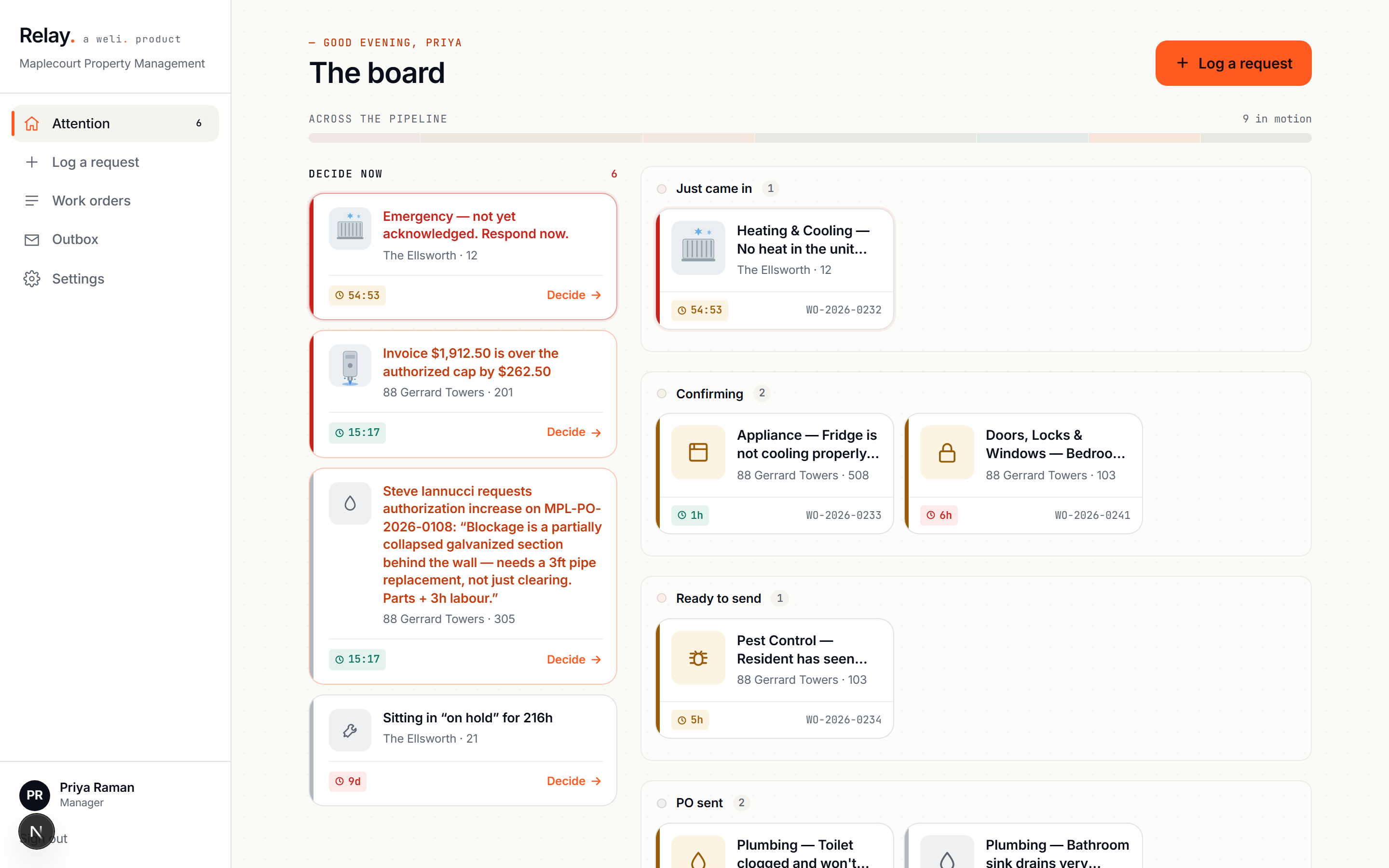
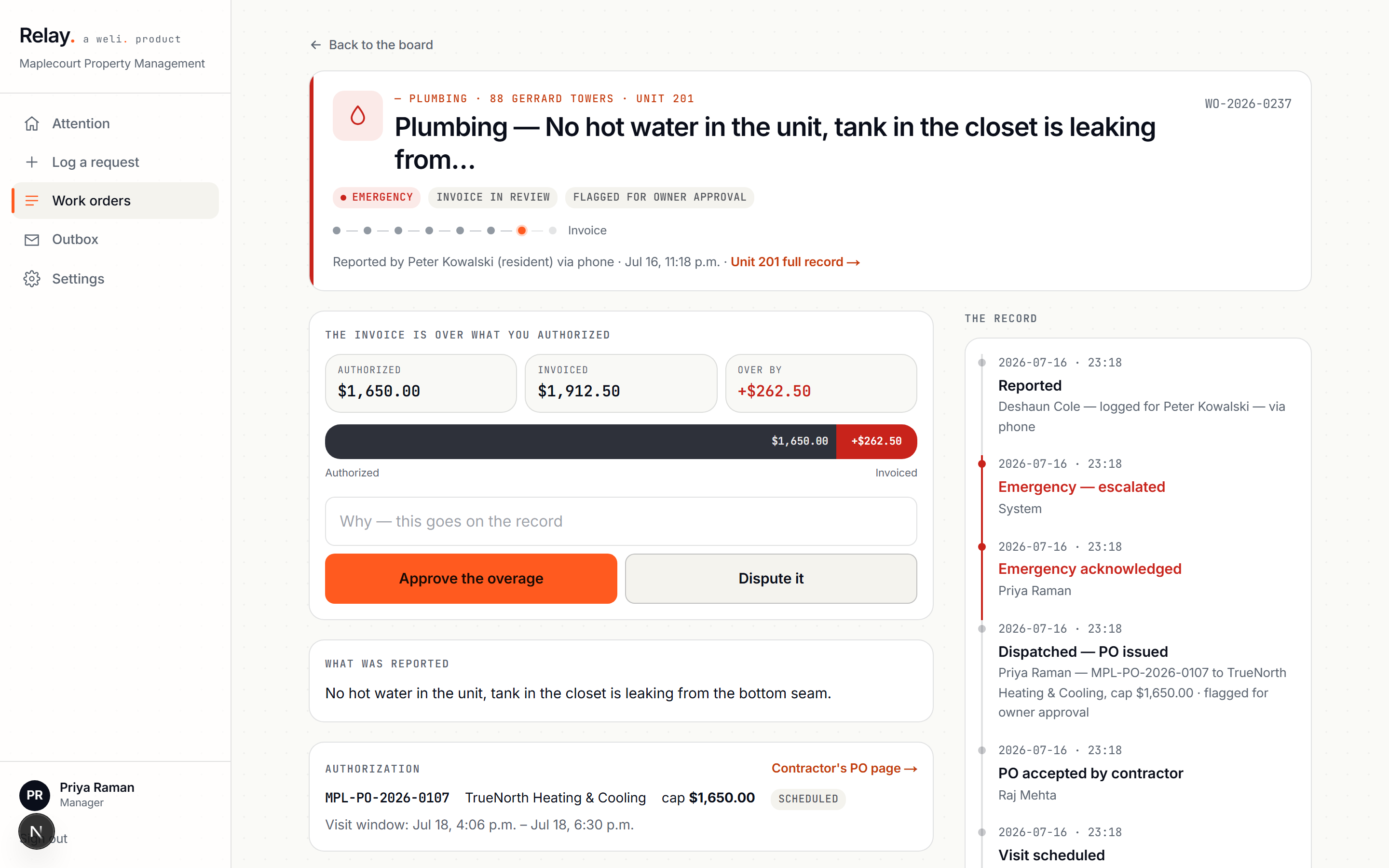
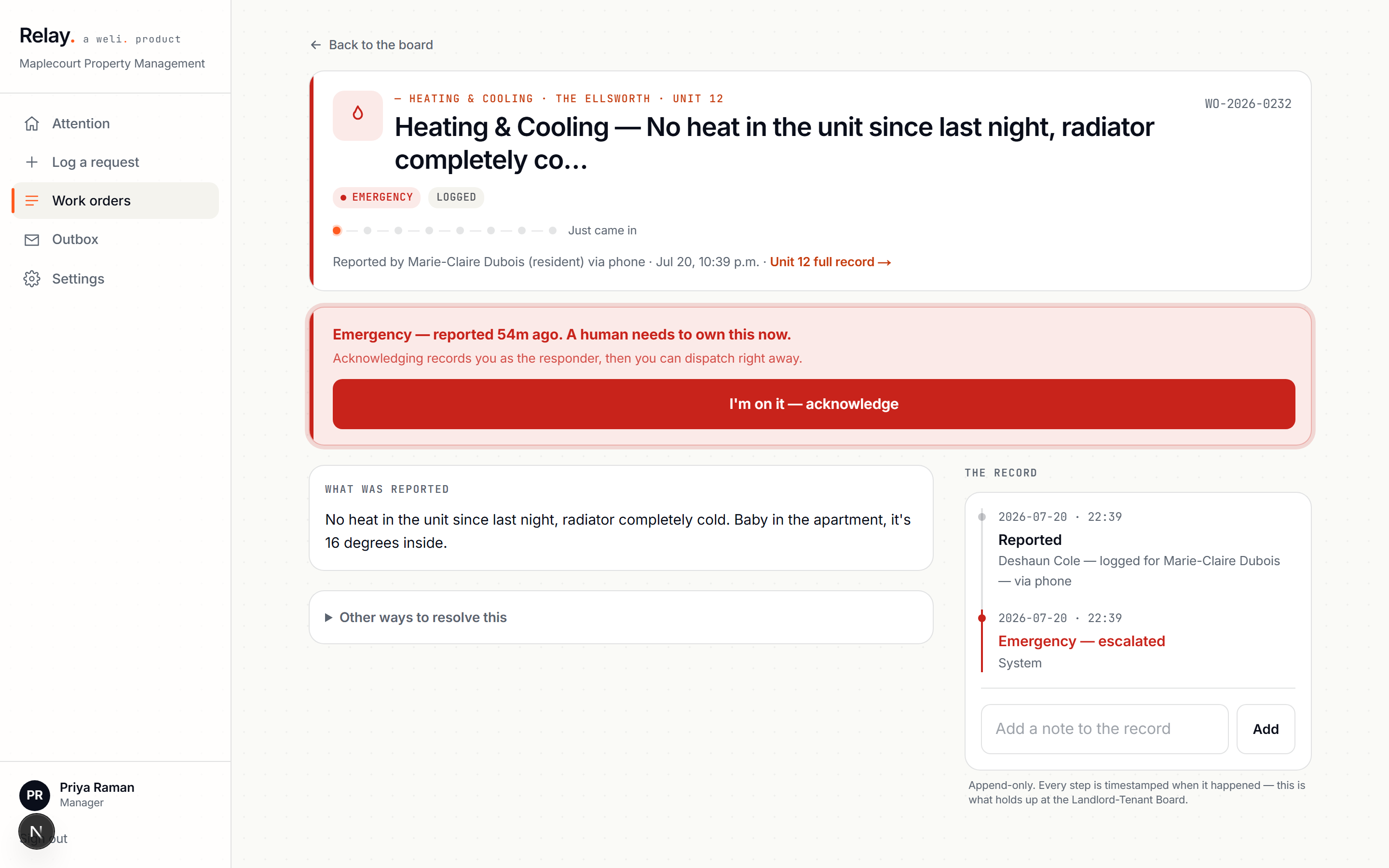
One board. Nothing waits on a spreadsheet to be seen.
Why bother
One caught over-cap invoice a month roughly pays for the tool.
The money loop is the wedge. One caught over-cap invoice a month roughly pays for the tool. And at ten calls a day, the relay work you do by hand adds up to around two hours a day you are not getting back.
The checkable part
Triage is deterministic code with pattern rules and negation handling, and runs with zero AI dependency, so "water is not pouring" will not trip an emergency. The triage and the state machine are unit-tested. No work is ever authorized without a written, capped purchase order, and the invoice is never auto-approved over that cap. Every state change is appended, so nothing overwrites the history.
The obvious objection
"My supers and contractors will never log into another system."
They don't have to. Your super confirms a job from a tokenized link on their phone, no account. Your contractor accepts a capped purchase order at a stable link, no account. The only person who signs in is you. The whole auth model was built because a super in a hallway will not maintain a password.
When to use it
Every service call, from report to closed invoice.
Every call
Every service call, from the first report to the closed invoice.
The 2 a.m. emergency
The 2 a.m. emergency that cannot wait in a queue.
Before a verbal okay
The moment you would otherwise give a verbal okay, so the cap is written before the work starts.
Questions, answered
Plain answers.
What does Relay actually do?
You enter a service call (or a resident files one through a per-building link), and Relay triages it, routes it to your super for confirmation, then dispatches a contractor on a numbered, capped purchase order. When the invoice comes in, Relay checks it against that cap and flags anything over it. The output is a closed work order with a dated, per-unit audit trail.
Who is it for?
Property managers running maintenance for residential buildings, the person who is currently the relay between tenants, supers, and contractors. It's built for firms who want a written cap on every job before work starts, not after the invoice arrives.
Where does my data go when I try the demo?
Relay is not hosted yet. Pilots run on your own infrastructure, with your property data staying in your environment. Nothing on this page collects your data.
Can I try it now?
Not as a self-serve demo. Relay runs as a private, white-glove pilot, one firm at a time. Book a walkthrough and we'll run a real service call through it with you.
Does it use AI to make decisions?
No. Triage is deterministic code with pattern rules and negation handling, not a language model guessing at severity, and it runs with zero AI dependency. The triage logic and the state machine are unit-tested, and an emergency always requires a human to acknowledge it before anything else can move.
What does it NOT do?
Relay is not hosted software you sign up for today, and it doesn't have photo upload, automated email/text, or phone-to-work-order yet, those are on the roadmap. It also never auto-approves an over-cap invoice; that decision always comes back to you.
How do I get this for my firm?
Book a 20-minute walkthrough and we'll set it up on your workflow: weli.ai/contact.
Get started
Book a 20-minute walkthrough.
Relay runs as a private pilot right now, onboarded one firm at a time. Book a walkthrough and we will run a real service call through it, from the report to the capped purchase order to the flagged invoice.
Private pilot · one firm at a time · photo upload, email/text, and phone intake are on the roadmap.