weli. Connect
Your booking system tells you what's in the fridge. We tell you where the money went.
weli. Connect is a suite of tools that sit around the software you already run and find the money leaking out of it: unbilled units, expiring Botox, and a revenue number you cannot act on. Two live demos today, more coming, no integration needed to try either.
InventoryTwo CSVs, zero integration
IntelligenceAnswers you can trace to the CSV
Your dataNever saved, not even locally
Every gapA signal, not a name
Watch it work
See the leak get found.
1 minute 6 seconds, real product, no slides.
The feeling you know
You read the deposit total and call it revenue.
- 01
You bought the Botox, drew it, and treated the patient, but somewhere between the vial and the chart, units go unbilled. Industry waste runs 10 to 20% per vial, and at $601 a vial that is real money you paid for and never charged.
- 02
Product expires in a drawer. The average med spa loses $4,000 to $12,000 a year to expired injectables and forgotten retail. An office manager once found $3,500 of Botox already six weeks past expiry.
- 03
You read revenue as one big number. You cannot see revenue per injector, average ticket, rebooking rate, or true margin per service, so you cannot act on any of it. A well-run clinic should clear 27.6% EBITDA; most run 8 to 14 points below that.
Benchmarks from industry reporting; sources available on request.
What it does
Two tools, each built around what you already export.
01
Drop in two CSV exports. (Inventory Intelligence, live now.)
Export received inventory and billed units from whatever system you run. The reconciliation subtracts billed from received, flags any lot or injector or day where the gap runs past the expected-waste band, and writes it in plain English: "Lot BTX-1234: 200 units received, 136 injected, about 34 unaccounted, roughly $280, concentrated on Tuesdays." The demo needs zero integration.
02
See the money leaks and the expiry radar.
Reconciliation in real dollars, an expiry radar that surfaces the $3,500 sitting in the fridge, a per-injector view, and reorder plus margin. Every gap is shown as a signal to look into, framed as waste or mis-log first, never as an accusation.
03
Drop in a booking export. (Business Intelligence, live now.)
Export your appointment and booking data separately from whatever scheduler you run. A deterministic engine computes revenue per injector, revenue by treatment, average ticket, rebooking rate, retail attachment, no-show impact, and per-service margin, then narrates them as a two-minute owner briefing you read on your phone.
04
Connect the rest as it ships.
Live pulls from your system, real-dollar margin from QuickBooks, and pushed daily briefings arrive at the v1 pilot stage. The suite ships one tool at a time on one shared spine, so the pieces feel like one platform.
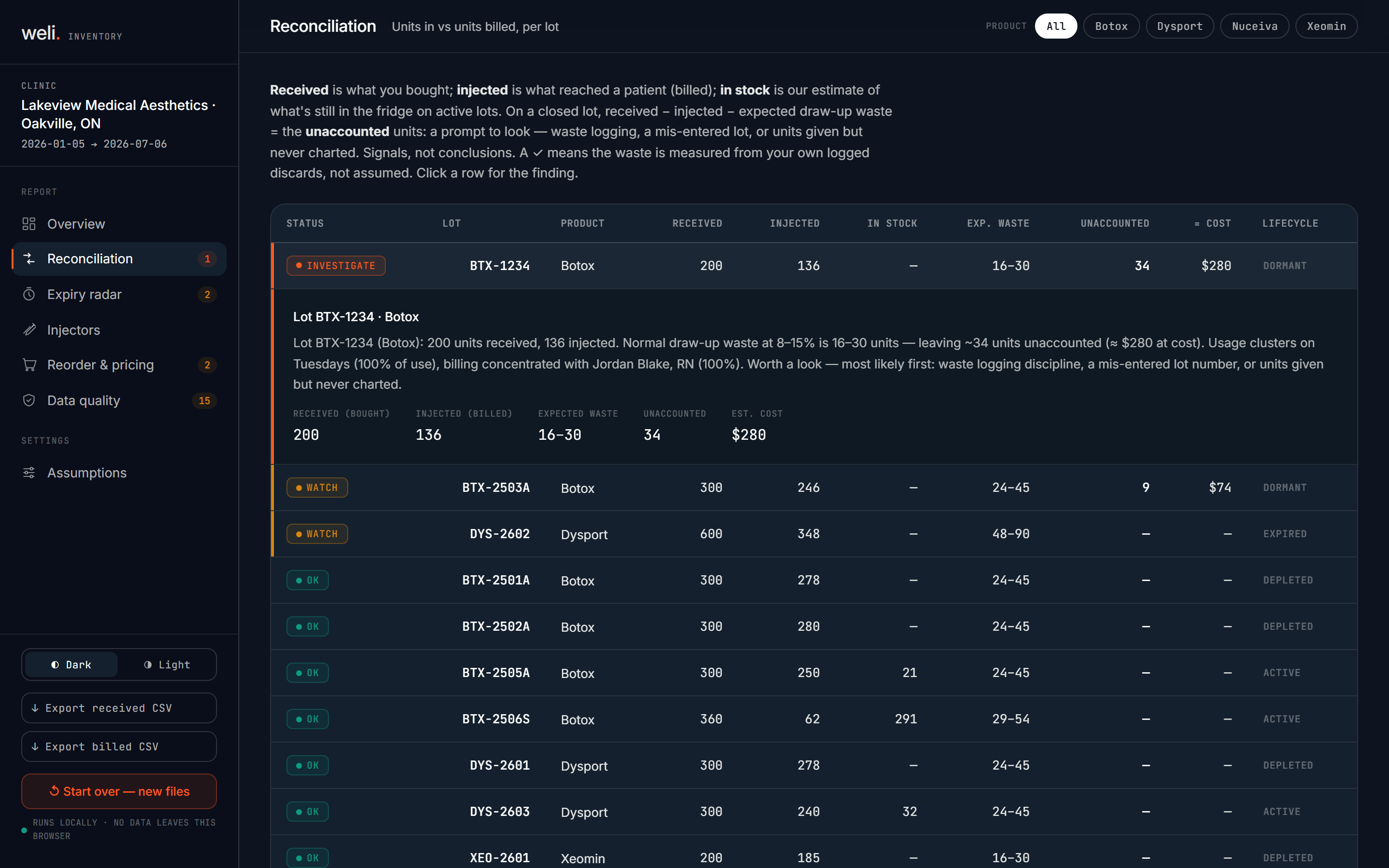
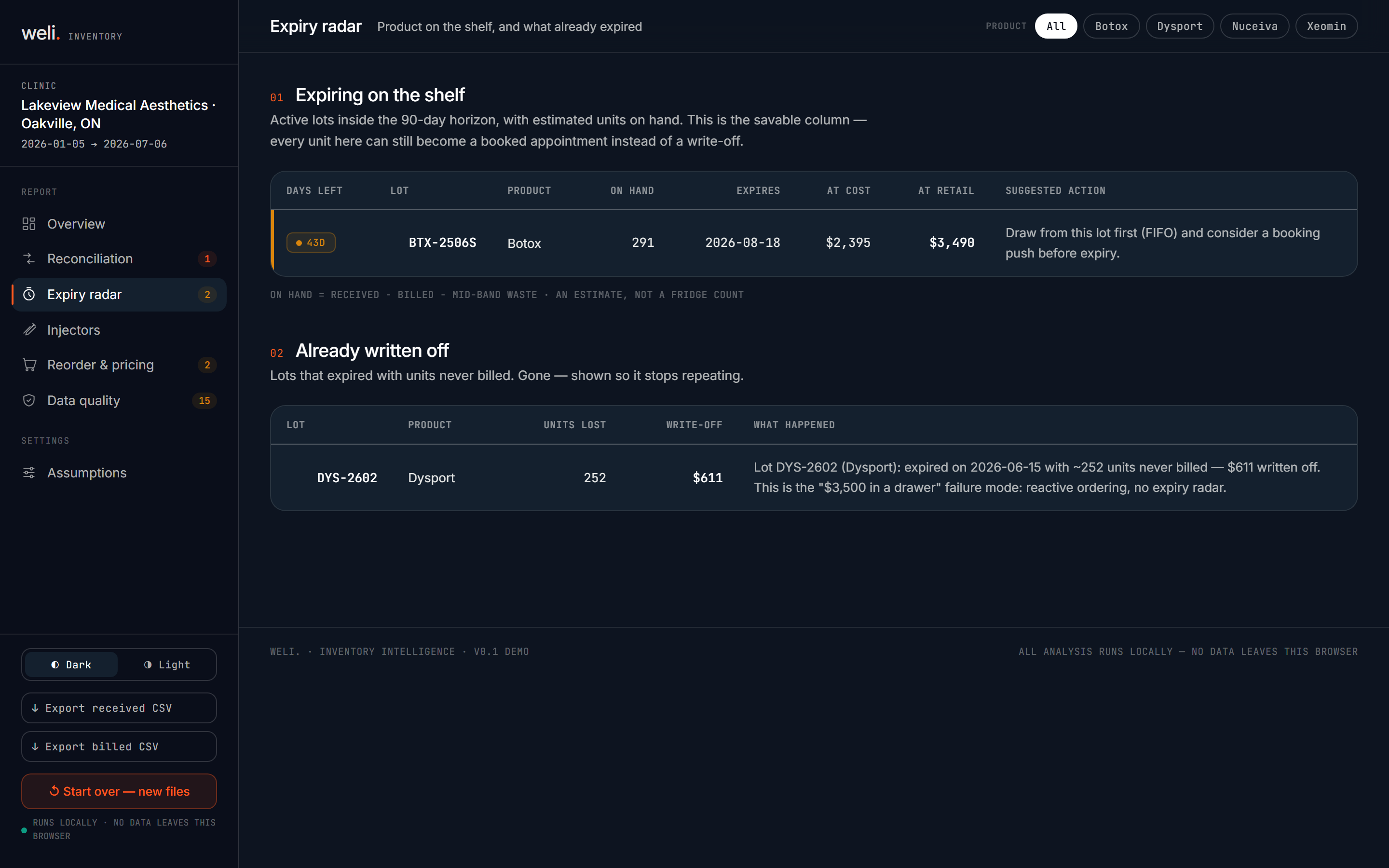
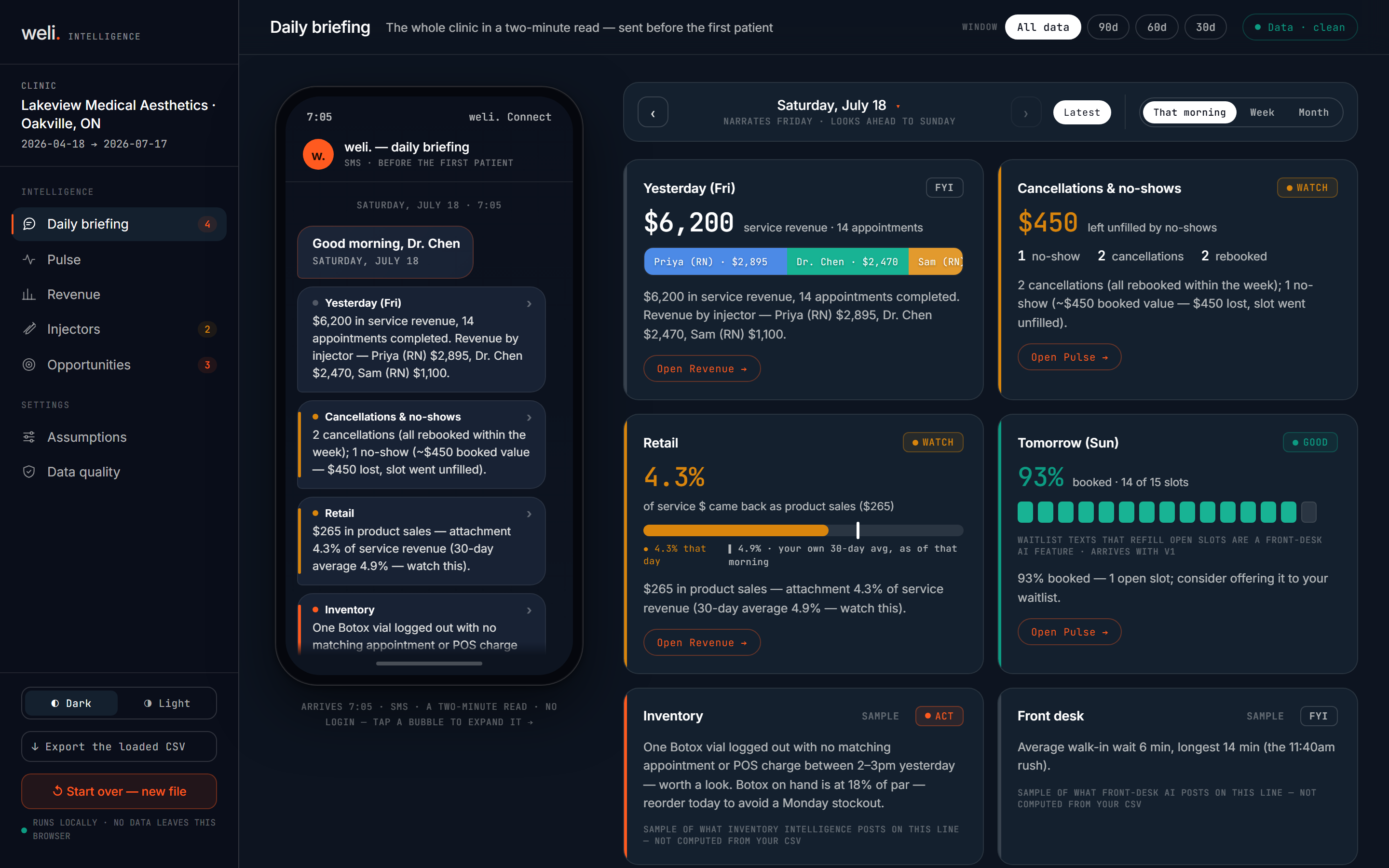
Two CSVs in. A money-leak readout back.
On the roadmap · Front-Desk AI
An AI voice agent that answers overflow and after-hours calls, books into your scheduler, and texts back every missed caller in seconds, so no inquiry goes to voicemail.
On the roadmap · Growth & Retention
Ties every ad dollar to the patient it booked, then wins back the ones who lapsed with redose-timed reactivation for patients who never came back.
Two tools, one suite
Two tools. Two different inputs.
Inventory Intelligence and Business Intelligence are separate tools that read separate exports. Neither needs the other to work, and each has its own demo.
Inventory Intelligence
Where the vial went.
Reconciles what you bought against what you billed.
What you feed it
Your inventory or usage export, plus your billing export: two CSVs, received units against billed units.
What you get back
Open Inventory demo
A lot-level reconciliation: received vs. billed vs. unaccounted units, the dollars attached to each gap, and an expiry radar for product still sitting in the fridge.
Business Intelligence
The whole clinic, briefed.
Turns your booking data into a two-minute morning read.
What you feed it
Your booking or appointment export: one CSV, nothing from Inventory needed.
What you get back
Open Business Intelligence demo
A whole-clinic daily briefing: revenue, cancellations, retail attachment, and tomorrow's booking load, read in two minutes before your first patient.
Why bother
Leave it alone and the waste stays invisible.
Ten to twenty percent of every vial, a few thousand a year in expired product, and a margin you are running below without knowing by how much.
The checkable part
In Business Intelligence, every figure (revenue by injector, average ticket, no-show impact, per-service margin) is a deterministic calculation, computed the same way every run. There's no AI or language model involved anywhere in that math; it's plain code reading your CSV. Inventory's reconciliation is a straight subtraction of billed from received, and the tool never reconciles silently over missing data; gaps in your export are shown, not papered over. Both are built PHIPA-first: Business Intelligence only ever handles clinic-level aggregates like "31 appointments, $14,200, 1 no-show," never a patient name.
Honest note: both tools are at v0.1, a live demo running on synthetic or dropped-in CSV data. Live integration with your system, QuickBooks margin, and pushed briefings are the next stage, not built yet. We do not fake-demo what is not built.
The obvious objection
"Is my patient data safe? These are health records."
Inventory works on lot numbers and unit counts, which are not personal health information. Business Intelligence works with clinic-level aggregates only, so what it handles is "$14,200 and one no-show," never a name or a chart. Your clinic remains the health information custodian under PHIPA; where a deployment does touch identifiable data, we operate under your policies as your service provider, with data kept in Canada. We do not replace your EMR; we sit beside it.
When to use it
At the end of a purchasing cycle, and first thing in the morning.
Inventory
At the end of a purchasing cycle, when you export received and billed units and want to know what did not turn into revenue, and before product ages out of the fridge.
Business Intelligence
First thing in the morning, before the first patient, when you want the whole clinic in two minutes instead of a deposit total.
Questions, answered
Plain answers.
What does weli. Connect actually do?
It's a suite of two live tools. Inventory Intelligence takes your received-inventory and billed-units CSVs and shows you which lots have unaccounted units and expiring product. Business Intelligence takes your booking export and turns it into a two-minute daily briefing on revenue, cancellations, and retail attachment.
Are Inventory and Business Intelligence the same tool?
No. They're separate tools with separate inputs and separate demos, sold as one suite. Inventory reads your inventory and billing exports; Business Intelligence reads your booking export. Neither needs the other to run, and you can try either one on its own.
Who is it for?
Med-spa owners and office managers who want to see where injectable product or revenue is slipping through, without waiting on a full system integration to find out.
Where does my data go when I try the demo?
Nothing is saved anywhere, not even in your browser. Both tools read your CSV in memory, right there in the tab, and show you the result. There's no server call, no account, and no local storage at all: refresh the page and the data is gone. That's stronger than a "your data stays local" promise; it's never saved in the first place.
Is this safe for patient data? What about PHIPA?
Inventory works on lot numbers and unit counts, not patient records. Business Intelligence works on clinic-level aggregates, not individual charts. Combined with the fact that neither tool stores or transmits anything (see above), there's no patient data sitting anywhere after you close the tab. Under PHIPA your clinic remains the health information custodian; for any deployment that does involve identifiable data, weli. works under your policies as your service provider, with data kept in Canada. These two demos simply don't touch identifiable data at all.
Does it use AI to make decisions?
No. Both tools are 100% deterministic calculation, no AI or language model involved anywhere. Every number (the reconciliation math, revenue per injector, average ticket, margin) is computed by plain code reading your CSV, the same way every run.
What does it NOT do?
Both tools are v0.1 live demos running on synthetic or dropped-in CSV data. Live integration with your inventory or booking system, real-dollar margin from QuickBooks, and pushed daily briefings are the next stage, not built yet. We don't fake-demo what isn't built.
How do I get this for my clinic?
Book a 20-minute walkthrough and we'll run it against a real export from your system, then set it up on your workflow.
Get started
Open the live demos.
Run the reconciliation on a CSV export and read a sample morning briefing. Both are live, both run on synthetic or dropped-in data, and neither touches your live system yet.
Both live at v0.1 on synthetic or dropped-in data. No live clinic integration yet.