Clockwork.
Never calculate a deadline by hand again.
The moment a deal goes firm, enter a few facts from the signed agreement. Clockwork computes every deadline, deposit due date, and condition clock using Ontario business-day rules, and shows its work. Change one date and everything downstream recalculates.
Date engineEvery date shows its work
Your dataStays in your browser
Every ruleCited to source
Reminders.ics calendar
Watch it work
See a deadline get computed.
A 64-second walkthrough, recorded from the live app. Real product, no slides.
The day you know
A condition period runs on business days, not calendar days.
- 01
A condition period runs on business days, not calendar days. You count them in your head, skip a stat holiday you forgot about, and land on the wrong Friday.
- 02
Time is of the essence. Miss a hard deadline without a written waiver and the agreement can go null and void: deposit back, property re-listed.
- 03
A verbal extension happens, nobody papers the new date, and the deal slips into default with a paper trail that says otherwise.
The condo status certificate is the classic one. The review window starts the day the document is received, not the day the deal was signed, and it lands in your inbox as an attachment while you are mid-showing.
What it does
Enter a few facts. It computes every date, and shows its work.
01
Activate the deal in about three minutes.
Enter the property, the acceptance and closing dates, the deposit, and each condition with its day type and anchor. It fits on one phone screen.
02
The engine computes every date.
Deposit due, each condition deadline, firm-up, lawyer package, requisition, walkthrough, closing. It uses Ontario business-day arithmetic with the statutory holiday calendar, and every date shows the weekends and holidays it skipped.
03
Change one date, and the rest follow.
An extension moves everything downstream, with an audit trail. Your overrides are pinned, never silently discarded. You stay the professional of record.
04
Export the calendar and a client status page.
Get a per-deal .ics file with reminders at 5 days, 72 hours, and 24 hours, so the alerts fire even with your laptop shut. Hand your client a plain-language, agent-branded status page.
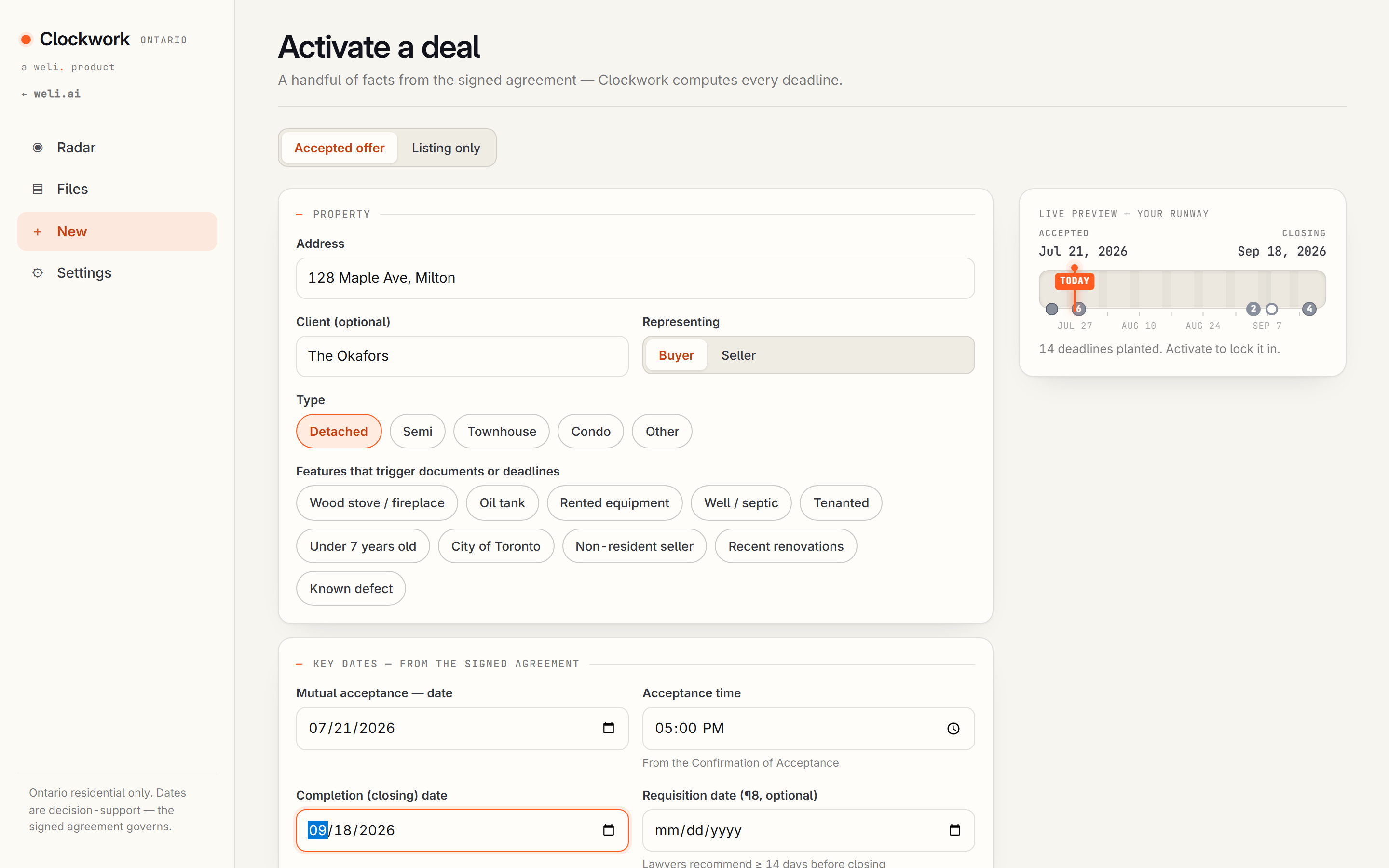
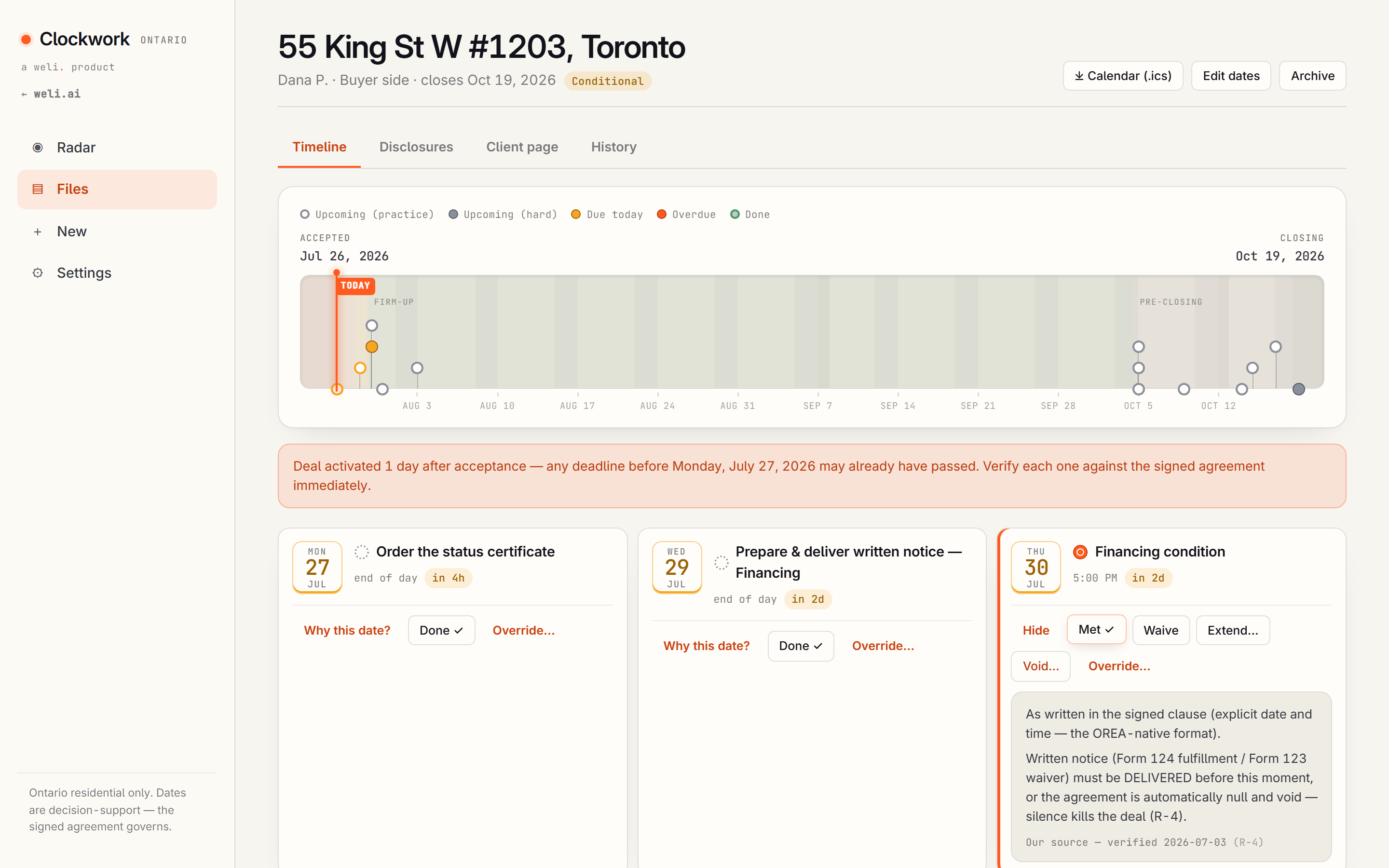
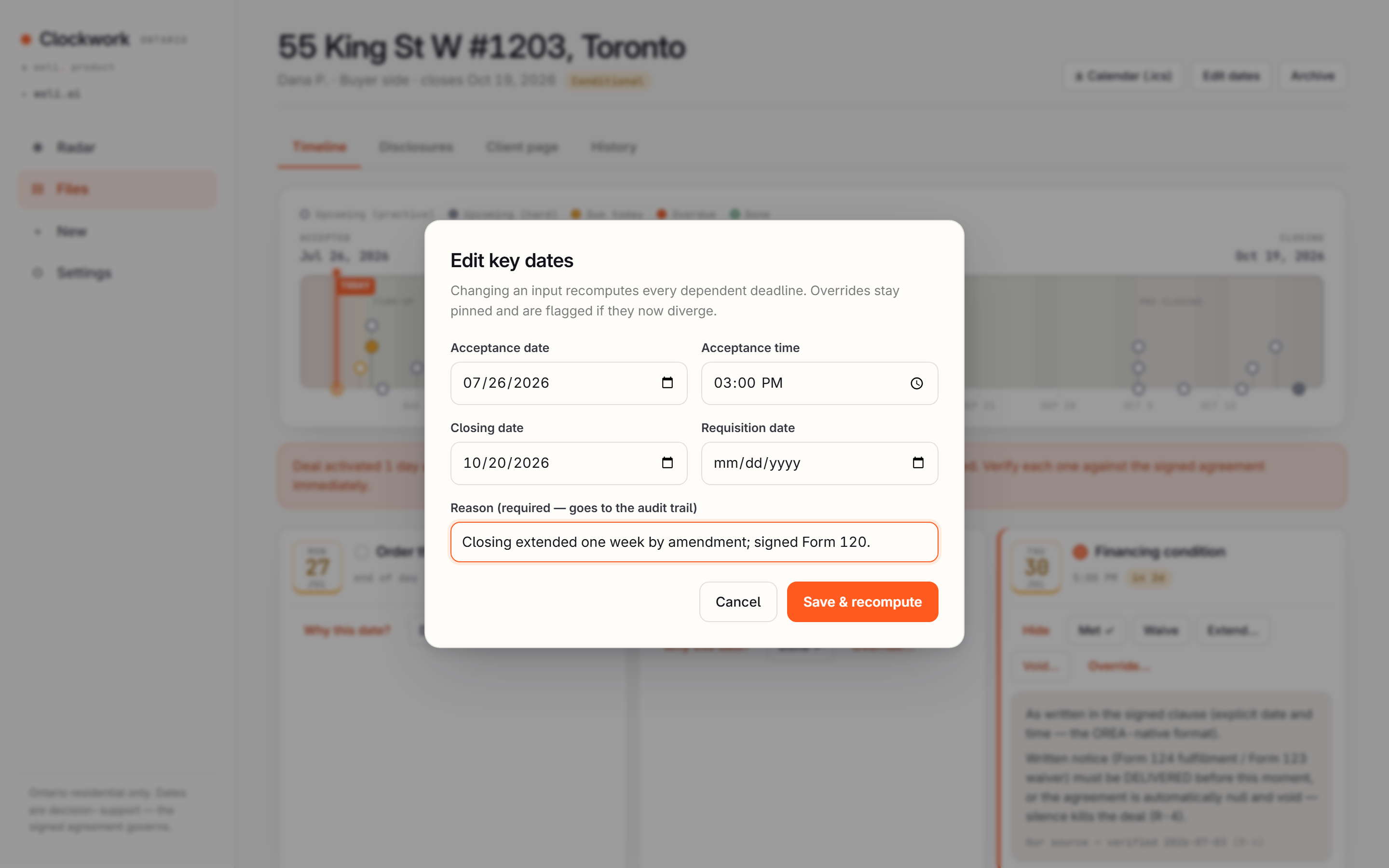
A few facts from the signed agreement. About three minutes.
Why bother
One blown financing condition costs thousands and a client.
Counting business days by hand under volume is exactly where that mistake happens.
The checkable part
The date engine is pure, deterministic, dependency-free code, covered by 111 unit tests and a 26-check end-to-end suite. Same inputs, same timeline, every time. No network, no clock reads, nothing that can hallucinate a date. Every encoded rule traces to a primary source (OREA Form 100, the Legislation Act, the Condominium Act, TRESA), verified 2026-07-03. When a deadline lands on a weekend or holiday, Clockwork warns you instead of silently rolling the date.
Clockwork produces decision support for a licensed professional. It is not legal advice and not an automated authority on deadlines. The signed agreement governs.
The obvious objection
"My deals are too custom for a calculator."
That is why you enter each condition yourself, with its day type, anchor, and time of day, and why every override is yours to pin. Clockwork does not decide your deal. It does the business-day arithmetic the same way every time and shows exactly which weekends and holidays it skipped, so you can check it in seconds.
When to use it
The moment a deal goes firm.
At firm-up
The moment a deal goes firm, from your phone, before you have driven home.
Status certificate
The day a status certificate arrives and the review clock starts.
A date moves
Any time a date moves and you need every downstream deadline to move with it.
Questions, answered
Plain answers.
What does Clockwork actually do?
You enter the facts from a signed agreement (the acceptance date, closing date, deposit, and each condition), and it computes every deadline that follows: deposit due, each condition's due date, firm-up, lawyer package, requisition, walkthrough, closing. The output is a list of dates, each one showing which weekends and holidays it skipped to get there.
Who is it for?
Ontario listing and buyer's agents who are tracking deadlines on live deals, usually right after a deal goes firm or a condo status certificate lands. It's built around Ontario business-day rules and OREA forms, so it's specific to Ontario resale transactions.
Where does my data go when I try the demo?
Clockwork runs entirely in your browser. There is no server, and nothing you enter is ever transmitted anywhere. Your deal data, settings, and any logo you upload are saved only to your own browser's local storage, and you can export or clear that data at any time.
Do I need an account? Is the demo free?
No account and no signup. The demo is free to try. Everything you enter stays in your own browser on your own device, and clearing your browser data clears it.
Does it use AI to make decisions?
No. The date engine is deterministic rules and math, covered by 111 unit tests, with every encoded rule cited to a primary legal source (OREA Form 100, the Legislation Act, the Condominium Act, TRESA). No language model is guessing at a date; the same inputs produce the same timeline every time.
What does it NOT do?
Clockwork produces decision support for a licensed professional. It is not legal advice and not an automated authority on deadlines. The signed agreement governs, and you're the one entering each condition and pinning any override.
How do I get this for my brokerage?
Book a 20-minute walkthrough and we'll show it against a real deal file, then set it up on your workflow.
Get started
Try the live app.
Activate a sample Ontario deal and watch every deadline compute, then move one date and see the rest follow.
Reminders are .ics calendar only. Decision support for a licensed professional, not legal advice.